 waply
Guide
WhatsApp API Cost in 2026 by Country — and What Changed in October
·
Meta charges the WhatsApp API per delivered message, by category and the recipient's country. On October 1, 2026, service messages started being charged (with 1,000 free per number per month), and so did utility templates inside the 24-hour window. Your Waply plan is separate; you can estimate Meta cost in the calculator.
This guide explains how Meta bills the WhatsApp Business Platform (API), what changed on October 1, 2026 in Argentina, Mexico, Colombia and Chile, and how to estimate that variable cost and separate it from your Waply plan. It is not about the WhatsApp Business phone app or mobile-carrier rates. Table rates are the snapshot embedded in Waply's calculator (current from 2026-07-01; October from 2026-10-01).
Free 3-day trial of AI 24/7, then pick a plan.
How Meta charges the WhatsApp API in 2026
There is no single fixed Meta fee for every business. Meta charges for each delivered message the business sends, by category (marketing, utility, authentication, service) and the recipient's market. On top of that comes what your platform charges (for example, your Waply plan) and, if you use third-party AI, the model cost.
Per delivered message, not per conversation
Since July 2025, Meta charges per delivered template message instead of per conversation. Messages a person starts (inbound) are free. Meta charges when the business delivers a billable message.
Four categories (+ Meta Business Agent)
- Marketing: templates for promotions, ads and re-engagement.
- Utility: templates for orders, payments, shipping and operational updates.
- Authentication: templates with one-time codes.
- Service: free-form messages inside the 24-hour customer care window.
- Meta Business Agent: charged by tokens (from August 2026). Waply is not that agent; its AI uses external model providers.
Price depends on the recipient's country
The market is defined by the country code of the customer's number, not your company's country. A message to a Mexican number uses Mexico rates even if your business is in Argentina.
What changed on October 1, 2026
Meta started charging per message for service messages (free-form replies inside the 24-hour window) and for utility templates sent inside that same window. Service messages include 1,000 free per business number per month; from the 1,001st they are charged. The free 72-hour free-entry-point window (Click to WhatsApp ads, Facebook button) stays for eligible message delivery.
- Service messages: billable after 1,000 free per number per month.
- Utility inside the 24-hour window: billable (does not use the service allowance).
- Marketing and authentication: still charged.
- Inbound messages: still free.
- 72-hour FEP window: kept for eligible delivery.
- Payment method in Meta: worth checking that it is loaded (the cutoff, according to Meta, was 09/30/2026).
1,000 free service messages per number
The allowance is per business number, does not roll over month to month, and resets each month. Waply's calculator applies it as 1,000 × number of phones. Overages use that market's service rate (same as utility/authentication for that market) and have no volume discounts.
Utility in-window is no longer free
Until September 30, 2026, utility templates inside the 24-hour window were usually free. From October 1 they are charged even when you reply inside that window (for example, an order or shipping notice). That utility does not consume the 1,000 service allowance.
If there was no payment method registered in Meta's Billing Hub by September 30, 2026, Meta may have stopped delivering service messages once they became billable on October 1. The customer loads that method in Meta; Waply does not hold it for you. If that is your case, it is worth reviewing it in Billing Hub as soon as possible.
Reference rates for Argentina, Mexico, Colombia and Chile
It depends on the category. With Meta's base USD rates from the rate card (Waply calculator snapshot):
Base USD rates per delivered message (Waply calculator snapshot)
| Market | Marketing (Jul 2026) | Marketing (Oct 2026) | Utility / Authentication | Service until 09/30 | Service from 10/01 |
|---|---|---|---|---|---|
| Argentina | 0.0618 | 0.0618 | 0.0260 | Free | 0.0260 |
| Mexico | 0.0305 | 0.0397 | 0.0085 | Free | 0.0085 |
| Colombia | 0.0125 | 0.0125 | 0.0008 | Free | 0.0008 |
| Chile | 0.0889 | 0.0889 | 0.0200 | Free | 0.0200 |
In October, Mexico marketing rose from 0.0305 to 0.0397 USD. Argentina, Colombia and Chile did not change marketing/utility/authentication in this snapshot, but all four gained a service rate equal to utility. Utility and authentication can drop with volume tiers; service, from October, does not.
Values in USD per delivered message, from Meta's rate card embedded in Waply's calculator (current rates effectiveFrom 2026-07-01; October effectiveFrom 2026-10-01). Meta may update rates each quarter. Meta bills in the currency you set on your account/WABA (ARS, MXN, COP, CLP or another); do not convert FX by hand in this article. Always verify the official card or the calculator.
What is charged from 10/01/2026
| Type | Charged? | Notes |
|---|---|---|
| Inbound message (customer → business) | No | Always free |
| Marketing (template) | Yes | Mexico rose in October |
| Authentication (template) | Yes | With volume tiers |
| Utility outside the window | Yes | With tiers |
| Utility inside the 24-hour window | Yes (from 10/01) | Does not use the service allowance |
| Service (free-form text) | Yes after 1,000/number/month | No volume tiers |
| Inside FEP 72 h (eligible delivery) | No | Meta Agent: tokens yes |
Two cost layers: Meta vs Waply (and AI)
Your Waply plan does not include Meta rates. The calculator estimates only Meta's variable charges in USD. Waply does not add markup on those Meta rates.
Cost layers
| Layer | What it is | Where you see it |
|---|---|---|
| Meta | Per delivered message | Meta invoice / Billing Hub; estimate in Waply's calculator |
| Waply | Subscription Basic USD 18 / AI 24/7 USD 39 / Voice AI USD 89 per month | Waply pricing page |
| AI (if applicable) | Provider model / tokens (managed or BYOK) | Waply plan or your own key; different from Meta Business Agent |
Waply is an independent product that installs in Kommo and connects to WhatsApp through Meta's official platform. Its text and voice AI uses external model providers; it is not Kommo's native AI.
The free 3-day trial is AI 24/7; then pick a plan. Meta charges and AI-provider charges (if applicable) are billed separately.
How to estimate your cost with Waply's calculator
Split volume by recipient country and category; apply the rates (and the 1,000 service allowance per number); add your Waply plan. Fastest path: use the calculator in From October 2026 mode (the October rates in this snapshot) and, if you want to see the difference, compare with Current rates.
- Open Waply's Meta pricing calculator.
- Choose the destination market (Argentina, Mexico, Colombia, Chile or another).
- Enter monthly volumes: marketing, utility, authentication, service; and the number of phones.
- Use From October 2026 for your estimate and compare with Current rates to see the difference.
- Optional: estimate outgoing call minutes; inbound calls are free on Meta.
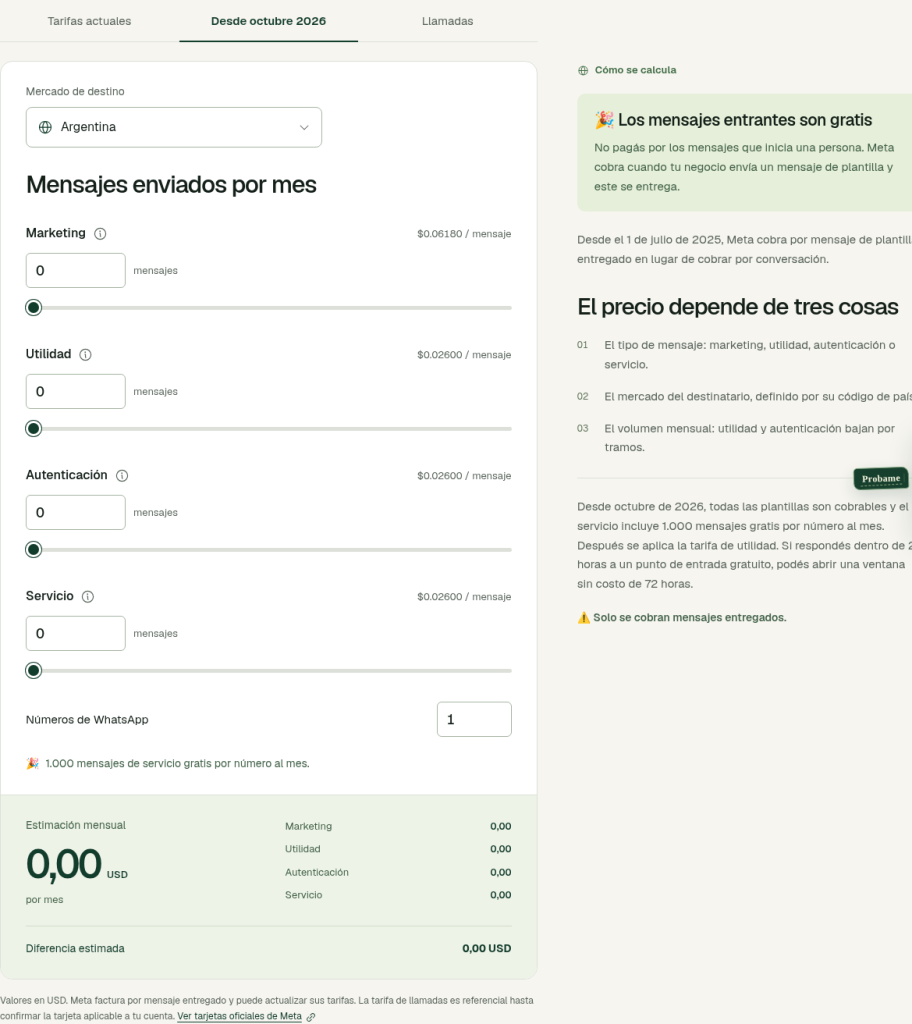
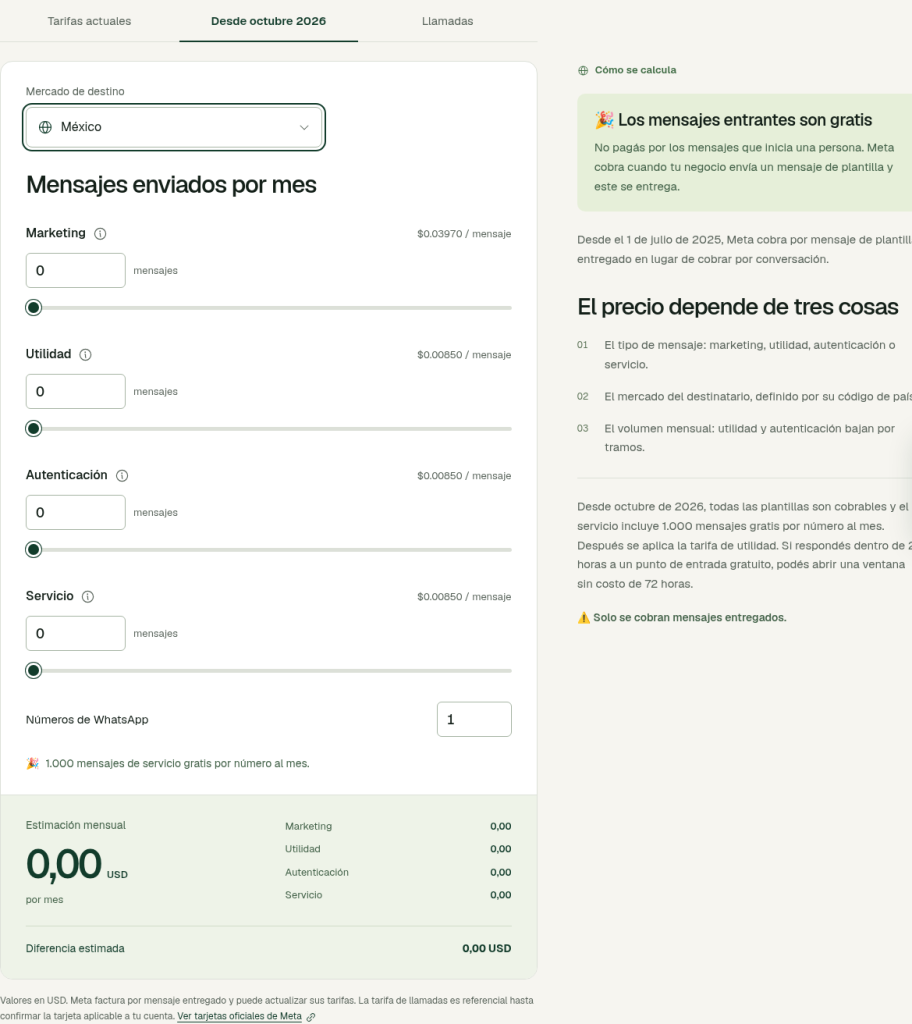
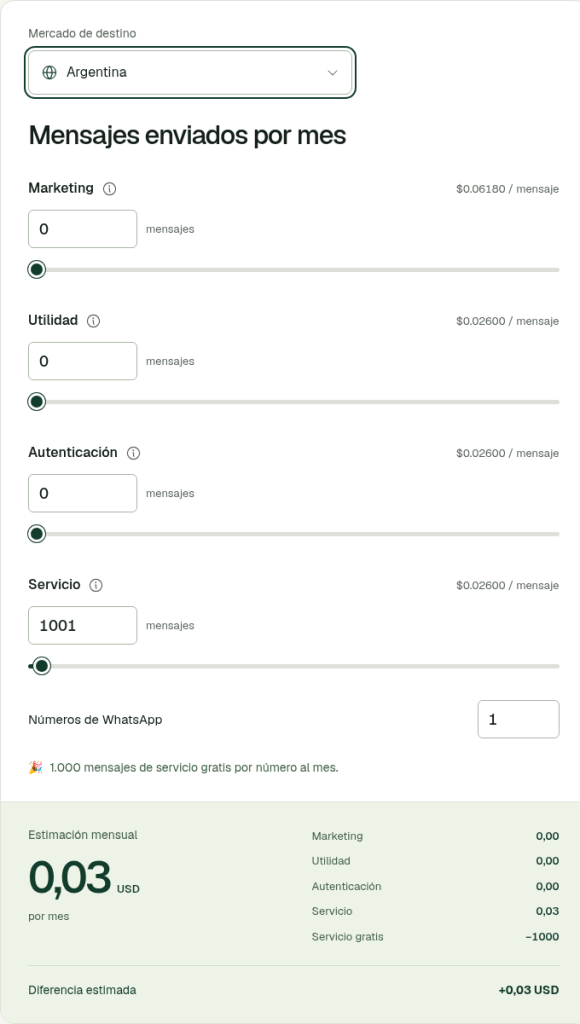
The calculator already covers categories, window, FEP, the 1,000 allowance and that the result is Meta-only in USD. This guide adds October context, the LatAm table, Waply vs Meta layers, the payment-method checklist and the Kommo angle.
Call rates in the calculator are referential. For call detail in Kommo, use the sister WhatsApp calls guide.
Practical tips to keep the bill under control after the October change
- Review how many service messages each number sends (human agents + bots).
- Do not assume everything in the 24-hour window is free: utility inside the window is now billable.
- Split marketing campaigns by country: Mexico rose in October.
- Use the 72-hour FEP window when the lead arrives from a Click to WhatsApp ad.
- Check that your payment method is loaded in Meta's Billing Hub (the cutoff, according to Meta, was 09/30/2026).
There is no typical savings percentage we can promise: impact depends on your mix of categories, countries and numbers.
Frequently asked questions
How much does the WhatsApp API cost in 2026?
There is no single fixed Meta fee for every business. Meta charges for each delivered message the business sends, by category (marketing, utility, authentication, service) and the recipient's market. On top of that comes what your platform charges (for example, your Waply plan) and, if you use third-party AI, the model cost.
What changed on October 1, 2026 in WhatsApp pricing?
Meta started charging per message for service messages (free-form replies inside the 24-hour window) and for utility templates sent inside that same window. Service messages include 1,000 free per business number per month; from the 1,001st they are charged. The free 72-hour free-entry-point window stays for eligible message delivery.
Are WhatsApp service messages free?
Until September 30, 2026, yes (in practice at the time). Since October 1, 2026, each number has 1,000 free service messages per month; overages are charged at that market's service rate (same as utility/authentication for that market). There are no volume discounts on service.
Does Meta charge for messages customers send me?
No. Messages a person starts are free. Meta charges when the business delivers a billable message (a template or, since October, service after the free allowance).
Does the Waply plan include Meta rates?
No. Waply's calculator and pricing page estimate or charge separately: the Waply plan is a subscription; Meta's variable charges are billed apart. Waply does not add markup on Meta rates.
How much does Waply cost?
Basic USD 18/month, AI 24/7 USD 39/month and Voice AI USD 89/month. The free 3-day trial is AI 24/7; then pick a plan. Meta charges and AI-provider charges (if applicable) are separate.
Do I need a payment method in Meta now that service messages are billable since October 1?
According to Meta, if there was no payment method registered by September 30, 2026, it may have stopped delivering service messages once they became billable on October 1. The customer loads the payment method in Meta's Billing Hub (not Waply). Worth reviewing or completing now if it is still pending (the cutoff was 09/30/2026).
How do I estimate my monthly cost?
Split volume by recipient country and category; apply the rates (and the 1,000 service allowance per number); add your Waply plan. Fastest path: use Waply's calculator in From October 2026 mode and, if you want to see the difference, compare with Current rates.
Estimate your Meta cost and install Waply in Kommo
Open the calculator to estimate your cost with the October 2026 rates and compare them with Current rates, review Waply plans and try AI 24/7 free for 3 days. Waply installs in Kommo, uses WhatsApp through Meta's official platform and keeps your AI independent.
Free 3-day trial of AI 24/7, then pick a plan.